mirror of
https://github.com/blakeblackshear/frigate.git
synced 2025-12-16 18:16:44 +03:00

136 lines
5.3 KiB
Markdown
136 lines
5.3 KiB
Markdown
# Frigate - Realtime Object Detection for IP Cameras
|
|
Uses OpenCV, Tensorflow/TensorRT to perform realtime object detection locally for IP cameras. Designed for integration with HomeAssistant or others via MQTT.
|
|
|
|
Use of a [Google Coral USB Accelerator](https://coral.withgoogle.com/products/accelerator/) or [Nvidia CUDA GPUs](https://developer.nvidia.com/cuda-gpus) is optional, but highly recommended. On my Intel i7 processor, I can process 24 FPS with the CPU. Budget entry-level GPU processes 64 FPS and powerful GPU or the Coral can process 100+ FPS with very low CPU load.
|
|
|
|
- Leverages multiprocessing heavily with an emphasis on realtime over processing every frame
|
|
- Uses a very low overhead motion detection to determine where to run object detection
|
|
- Object detection with Tensorflow runs in a separate process
|
|
- Object info is published over MQTT for integration into HomeAssistant as a binary sensor
|
|
- An endpoint is available to view an MJPEG stream for debugging, but should not be used continuously
|
|
|
|

|
|
|
|
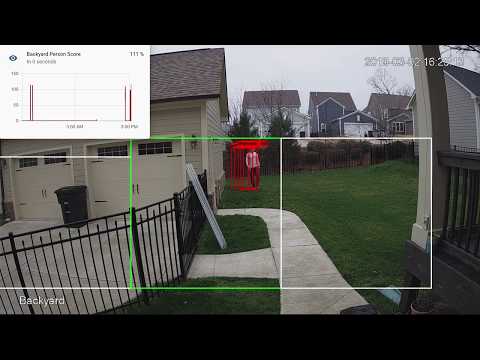
## Example video (from older version)
|
|
You see multiple bounding boxes because it draws bounding boxes from all frames in the past 1 second where a person was detected. Not all of the bounding boxes were from the current frame.
|
|
[](http://www.youtube.com/watch?v=nqHbCtyo4dY "Frigate")
|
|
|
|
## Getting Started
|
|
Run the container with
|
|
```bash
|
|
docker run --rm \
|
|
--privileged \
|
|
--shm-size=512m \ # should work for a 2-3 cameras
|
|
-v /dev/bus/usb:/dev/bus/usb \
|
|
-v <path_to_config_dir>:/config:ro \
|
|
-v /etc/localtime:/etc/localtime:ro \
|
|
-p 5000:5000 \
|
|
-e FRIGATE_RTSP_PASSWORD='password' \
|
|
blakeblackshear/frigate:stable
|
|
```
|
|
|
|
To run GPU accelerated `frigate-gpu` Docker image use the [NVIDIA Container Toolkit](https://github.com/NVIDIA/nvidia-docker/wiki/Installation-(Native-GPU-Support)).
|
|
If your GPU supports Half precision (also known as FP16), you can boost performance by enabling this mode as follows:
|
|
`docker run --gpus all --env TRT_FLOAT_PRECISION=16 ...`
|
|
|
|
Example docker-compose:
|
|
```yaml
|
|
frigate:
|
|
container_name: frigate
|
|
restart: unless-stopped
|
|
privileged: true
|
|
shm_size: '1g' # should work for 5-7 cameras
|
|
image: blakeblackshear/frigate:stable
|
|
volumes:
|
|
- /dev/bus/usb:/dev/bus/usb
|
|
- /etc/localtime:/etc/localtime:ro
|
|
- <path_to_config>:/config
|
|
ports:
|
|
- "5000:5000"
|
|
environment:
|
|
FRIGATE_RTSP_PASSWORD: "password"
|
|
```
|
|
|
|
Please note that native GPU support has not landed in docker-compose [yet](https://github.com/docker/compose/issues/6691).
|
|
|
|
A `config.yml` file must exist in the `config` directory. See example [here](config/config.example.yml) and device specific info can be found [here](docs/DEVICES.md).
|
|
|
|
Access the mjpeg stream at `http://localhost:5000/<camera_name>` and the best snapshot for any object type with at `http://localhost:5000/<camera_name>/<object_name>/best.jpg`
|
|
|
|
Debug info is available at `http://localhost:5000/debug/stats`
|
|
|
|
## Integration with HomeAssistant
|
|
```
|
|
camera:
|
|
- name: Camera Last Person
|
|
platform: mqtt
|
|
topic: frigate/<camera_name>/person/snapshot
|
|
- name: Camera Last Car
|
|
platform: mqtt
|
|
topic: frigate/<camera_name>/car/snapshot
|
|
|
|
binary_sensor:
|
|
- name: Camera Person
|
|
platform: mqtt
|
|
state_topic: "frigate/<camera_name>/person"
|
|
device_class: motion
|
|
availability_topic: "frigate/available"
|
|
|
|
automation:
|
|
- alias: Alert me if a person is detected while armed away
|
|
trigger:
|
|
platform: state
|
|
entity_id: binary_sensor.camera_person
|
|
from: 'off'
|
|
to: 'on'
|
|
condition:
|
|
- condition: state
|
|
entity_id: alarm_control_panel.home_alarm
|
|
state: armed_away
|
|
action:
|
|
- service: notify.user_telegram
|
|
data:
|
|
message: "A person was detected."
|
|
data:
|
|
photo:
|
|
- url: http://<ip>:5000/<camera_name>/person/best.jpg
|
|
caption: A person was detected.
|
|
|
|
sensor:
|
|
- platform: rest
|
|
name: Frigate Debug
|
|
resource: http://localhost:5000/debug/stats
|
|
scan_interval: 5
|
|
json_attributes:
|
|
- back
|
|
- coral
|
|
value_template: 'OK'
|
|
- platform: template
|
|
sensors:
|
|
back_fps:
|
|
value_template: '{{ states.sensor.frigate_debug.attributes["back"]["fps"] }}'
|
|
unit_of_measurement: 'FPS'
|
|
back_skipped_fps:
|
|
value_template: '{{ states.sensor.frigate_debug.attributes["back"]["skipped_fps"] }}'
|
|
unit_of_measurement: 'FPS'
|
|
back_detection_fps:
|
|
value_template: '{{ states.sensor.frigate_debug.attributes["back"]["detection_fps"] }}'
|
|
unit_of_measurement: 'FPS'
|
|
frigate_coral_fps:
|
|
value_template: '{{ states.sensor.frigate_debug.attributes["coral"]["fps"] }}'
|
|
unit_of_measurement: 'FPS'
|
|
frigate_coral_inference:
|
|
value_template: '{{ states.sensor.frigate_debug.attributes["coral"]["inference_speed"] }}'
|
|
unit_of_measurement: 'ms'
|
|
```
|
|
## Using a custom model
|
|
Models for CPU/GPU and EdgeTPU (Coral) are bundled in the images. You can use your own models with volume mounts:
|
|
- CPU Model: `/cpu_model.pb`
|
|
- GPU Model: `/gpu_model.uff`
|
|
- EdgeTPU Model: `/edgetpu_model.tflite`
|
|
- Labels: `/labelmap.txt`
|
|
|
|
## Tips
|
|
- Lower the framerate of the video feed on the camera to reduce the CPU usage for capturing the feed
|
|
- Choose smaller camera resolution as the images are resized to the shape of the model 300x300 anyway
|